
We’re a location based social app for musicians. So, it goes without saying… We sometimes want to talk about locations! For this post, guest writer Holly Lucas has covered one of the music industry’s most iconic locations – Las Vegas. 🎰
Guest Post Written by Holly Lucas
Residencies in Las Vegas have been popular attractions since the days of The Rat Pack, Elvis Presley, and Liberace.
The city’s high-level entertainment scene has long offered fun ways for guests to take breaks from the poker tables and slot machines. Therefore, it has naturally become a reliable source of revenue for casinos and musicians alike.
Shifting Sands
For a time in the ’70s and ’80s, people considered the desert city as a retirement home for musicians in decline. Musicians who stopped attracting big-money tours salvaged an income here. Thus, they could leave the limelight gracefully with music jobs in Las Vegas.
However, today’s Vegas could not be any more different from that of decades past.
Las Vegas music job potential now rivals the best music cities in America. It has become a shining beacon both for working musicians and others in the industry.
Las Vegas has seen an uptick in top-quality headliners buoyed by high-profile appearances from A-lister musicians. They rout tours through the city, or engage in long residencies that gross millions. Posters and advertisements are plastered to the sides of skyscrapers. Shows like these attract visitors from around the globe.
There are a few reasons the likes of Beyoncé, Drake, Lady Gaga, and Eminem have all capitalized on this. Firstly, they’ve found opportunities to create once-in-a-lifetime showcases. Secondly, they can earn money while staying in one place, avoiding the headaches and overhead of travel. Lastly, they can also lean on the existing infrastructure and talent pool of Vegas. This results in what are often career-defining shows.
Musicians travelling to Las Vegas, or fortunate to get a booking there, can utilise their free time away from the slots and tables networking. This could be to meet other travelling musicians or locals. To do this, just open your Vampr app on the discovery screen and adjust the location settings to your current location. This might be a chance to get lucky and catch a high rolling Las Vegas music job! 🃏
Lounges and Lobbies
The major casino resorts in Vegas are still best known for their games. Endless streams of guests at slot reels and poker tables provide the bulk of the resorts’ revenue. At the same time, Vegas visitors take breaks amidst their hours-long gaming sessions. These visitors often venture into lobbies, lounges, and bars alongside casinos. Lesser-known artists often play in these and can attract new fans.
It is in the casinos’ interest to make sure these side spaces are entertaining as well. So, it is perhaps not surprising that many of the best poker rooms in Vegas reside mere steps away from bars and other smaller venues. Here, musicians are taking their shots at recognition.
The casinos intentionally place entertainment in “side” or “break” areas alongside their primary gaming offerings. Places like:
- MGM Grand’s Losers Bar
- Rockhouse at the Venetian
- The piano bar at Harrah’s
…and any number of even smaller spots are great places to spot less famous artists or pick up Las Vegas music jobs.
Behind the Scenes
Behind any good event, whether in a lounge or a world-famous arena, there is always a team of unsung heroes working hard.
- Promoters
- Ticket sellers
- Light
- Sound
- Staging crews
There are plenty of people helping shows to get off the ground.
These Las Vegas music jobs are often taxing and can involve long hours. But, it’s these jobs that make Vegas a perfect place to find steady work and settle down in one place.
Networking with music bookers, musicians and other music industry workers in Las Vegas is simple using Vampr.
The Underbelly
It’s not all big budgets and glamor. Like most big cities across the country, there is a thriving alternative music scene in Las Vegas. – Perfect for all the purists out there keen to explore beyond the beaten path. In fact, there is a huge undercurrent of venues where small-to-medium-sized acts can get their time on the stage to woo new fans.
Venues in Vegas like:
- Velveteen Rabbit
- Double Down Saloon
- Backstage Bar & Billiards
…regularly host bands.
Record shops in Vegas like:
- 11th Street Records
- Moondog Records
- Record City
…have enough vinyl to satisfy even the most demanding of collectors.
Particularly in the downtown area, almost any night of the week you can stumble across bars with scrappy young indie, punk, country and folk bands organizing their own gigs and taking their shots at building a fan base. DJs easily find Las Vegas music jobs at hotels and parties. Furthermore, there are plenty of opportunities for other genres of music to be showcased.
Networking
The old saying of “it’s not what you know, it’s who you know” rings true in the music industry. And Las Vegas is undoubtedly a good place for musicians to network. The tables, bars, and dining areas of some of Vegas’s best casinos are busy hives of activity. Musicians can meet people with shared interests and aspirations.
When they’re lucky, they might just meet the right person who can make a difference and launch a career.
All in all, the history and legacy of Vegas combined with its diverse indie scene makes Sin City an exciting destination for people seeking Las Vegas music jobs.
It has become a must-visit destination for hungry musicians and others in the industry.
Written for vampr.me by Holly Lucas
Today we’re incredibly excited to be launching our third equity crowdfunding round on the back of hitting a phenomenal milestone with 1 million users!
https://www.wefunder.com/vampr
Vampr is a company largely owned by its users, with two previous successful Reg CF campaigns providing us with the means to grow the company and keep Vampr as the go-to network for musicians and creatives.
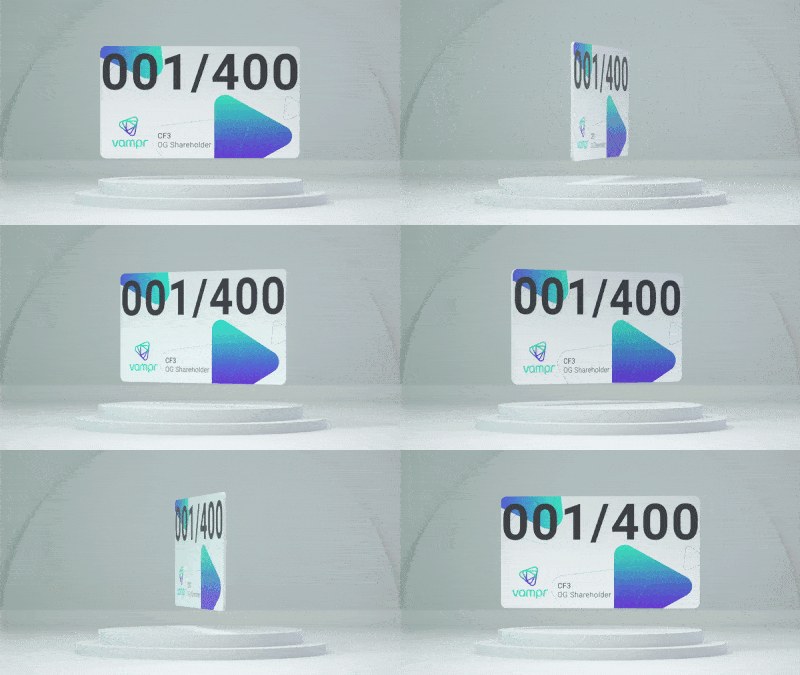
This latest campaign will offer our community the opportunity to take an ownership stake in the company and join our existing 2200+ user-investors for as little as $250. We also have 200 unique Vampr NFTs remaining for people who invest $500 or more. We’ll come back to that at the end of the blog 😉
The journey so far
When Baz and I launched our first crowdfunding campaign in 2019, we came to the public with a vision to expand our network beyond basic musician roles, and to increase the usefulness of Vampr to the broader creative community. With more than 20,000 creative skill types now listed on the platform we can comfortably say: Mission accomplished ✅
2020 saw us build on this momentum with a second crowdfunding round, and a plan to transition Vampr into a true marketplace where both the company and our users were able to make money from the inherent opportunity and value of this fast growing network. And well, the proof is in the numbers, which you can check out on the updated campaign page: www.wefunder.com/vampr
Where to from here?
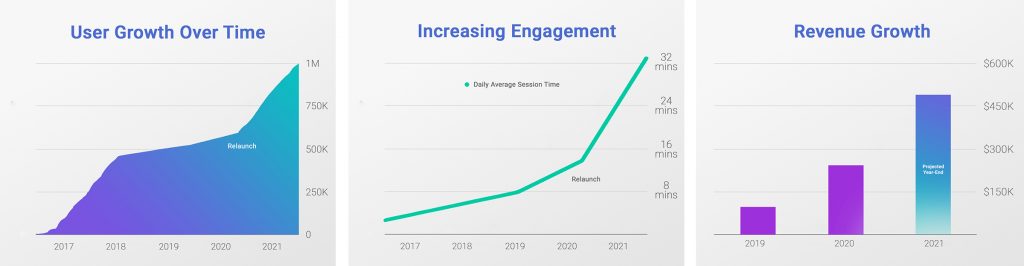
It’s been a year of big wins and big multiples!
Across the metrics which matter, almost everything has doubled:
One more thing…
Today we officially hit 1 million users on Vampr! That’s a global community of 1 million musicians and creatives who have together:
- Created over 220,000 original songs with people they’ve met on Vampr
- Enjoyed a combined 62.5 BILLION streams on Spotify, Apple Music, TikTok and Soundcloud
- Generating significant royalties of $162M flowing directly into their pockets
Baz and I are both blown away and incredibly proud of these milestones – so we made a video to celebrate!
I want to thank Music Week for breaking the story, my impossibly hard working team, each and every one of our supportive shareholders, and, most importantly, our now 1 million strong Vampr community.
Here’s to the next million – Josh ✌️
The best music distribution strategy for 2023 includes a mixture of sending music to:
- Digital service providers
- Social media platforms (Instagram, Facebook and TikTok)
- Traditional music formats (such as digital download and physical – vinyl, CD, cassette)
The music industry continues to evolve with ever-faster technology developments. It’s important that your music distributor is reaching where most people consume music.
Digital Service Providers
The platforms your music is expected to be on:
- Spotify
- Apple Music
- YouTube Music
- Amazon Music
- Deezer
- TIDAL
Also, include more niche music platforms such as SoundCloud and Bandcamp. Music is distributed to these platforms directly on the platform.
It is likely that digital music distribution will also evolve to include music distribution to games, but that’s not a reality (just yet…)
Downloads
The mass market mainly uses streaming platforms to consume music. However, that’s not to say there’s not a market for downloads.
If you make electronic music, for example, you will want to submit to sites that DJs use to download music. Examples include:
- Beatport
- Juno Download
- Bandcamp
- Traxsource
- BLEEP
Some distributors will have partnerships with these stores. If so, they’ll deliver your music to them. If your distributor does not work with them you will need to submit directly.
Other music genres, such as those that appeal to older audiences, may want to download music. This is usually covered by your digital music distributor to stores such as Amazon.
Additionally, there are beat marketplaces such as Gemtracks you may want to consider sending your music to if you are looking for an alternative business model to traditional digital distribution.
Physical
Beyond digital, there’s also a vinyl revival happening.
It won’t be a good idea for everybody to release music to physical formats such as vinyl. But, there are some indicators of when it might be a good idea:
- Consider the number of fans you have. You should have enough fans to cover your vinyl production costs if you sell to 10% of your fanbase. If so, it might be a good idea to get a short-run vinyl pressing
- Use polls and feedback from fans to indicate their interest in buying vinyl from you. 10% is a good number to keep in mind. So, if you want to sell 100 records – it’s best to get registered interest from 1000 fans.
- Are you playing live a lot? Your chances of selling vinyl are much higher in person.
- Are your fans the type of people who would typically buy vinyl?
What is music distribution?
Music distribution is the service between the seller and the stores and platforms that sell or stream it.
Traditionally, a music distributor would develop relationships with stores in multiple locations. They’d increase the presence of records on the shelves to expose the release.
Record labels would have a distribution partner they trusted and would work closely with them to maximize sales.
Digital Music Distributors
Nowadays, digital music distribution companies deliver music to streaming platforms (DSPs). Additionally, they send music to digital download stores.
They have less personal relationships with the stores than they would have done in the old days. However, they do have to have a solid infrastructure to manage quality control and high volumes of tracks.
If you’re an artist wondering how to submit music to Spotify or other DSPs without a record label, you must use a distributor.
Vampr Pro gives unlimited distribution to all major stores and streaming platforms. Importantly, 100% of the royalties are paid to the artists! The best music distribution deals consider how important it is for artists to keep their royalties.
After you’ve signed up for Vampr Pro, you can go directly to the distribution portal on a computer. Then, send your music to stores and streaming services, like Spotify and Apple Music.
Once you have a presence on Spotify, you can then sign up for their Spotify for Artists services. This provides detailed analytics about the performance of your song, as well as listener demographics.
The Difference Between a Music Distributor and a Music Publisher
A music publisher and a music distributor solve two very different problems for songwriters and artists.
Music publishing is the business of protecting and exploiting musical works assets. These are intellectual property comprising composition and lyrics.
Music streaming distribution is the business of distributing recorded music to music digital service providers.
Therefore, you don’t “publish” your music on Spotify (as sometimes it is confused).
Side note: However, because the music (not the recording) itself is also being used, publishers are entitled to a mechanical royalty. This would be paid to you or your publisher via a performance rights organization.
Publishers and distributors work completely separately from one another. The best way to understand this concisely is to properly understand music licenses.
Record Labels
Traditionally, it would be record labels working with distributors, not artists themselves.
Record labels would be responsible for producing, manufacturing and marketing a record. They would also be responsible for managing the relationship with distributors and therefore stores.
Now, it has become much more common for artists to submit music directly to distributors.
The role of record labels is ever-changing. The decision of whether to work with a record label is now assessed on a case-by-case basis. Some things to consider that record labels do in 2021 include:
- Manage record release marketing strategy and campaigns
- Organise distribution
- Market artists and records
- Analyse data trends
- Understand music audiences deeply
- Some will have niche followings that will trust them to sign artists they will love
- Sometimes organize merch
- Sometimes organize physical records
What Does a Digital Music Distributor Do?
Digital music distributors receive music from record labels and artists. They process the music and metadata ready to deliver to:
- Streaming platforms
- Social platforms
- Digital download stores
They collect royalties earnt from plays, streams and downloads. They also manage payments to record labels and artists.
Digital music distributors do not help with marketing, promoting or pitching. However, some distributors offer this as a separate service, known as artist services.
Vampr Distribution allows you to send your music to:
- Spotify
- Apple Music
- YouTube and YouTube Music
- Amazon Music
- Deezer
- TIDAL
- Soundcloud
- TikTok
- Tencent
…and many more!
Distributors will pay you master royalties for music played on streaming platforms.
Some distributors will charge per release, some per month and many take a percentage of your master royalties to use their service.
Vampr pays 100% of royalties earned from streams across all platforms and stores. Digital music distribution is free with a Vampr Pro subscription!
How to Distribute Your Music with Vampr
Getting Started
- Sign up for Vampr Pro
- Click here and enter your email address to sign in.
You will be sent a unique login ID to your email address every time you log in. This authenticates your identity. - Click the ‘Create a release’ button on the Vampr Distribution home page.
Release Name & Cover Art
- Enter the name of the release – whether it’s the single, EP or album title.
Do not use ALL CAPs or your release will be rejected by the DSPs. Click ‘Create Release’

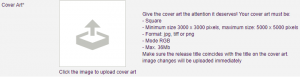
- Upload Cover Art.
Click on the image to upload your cover art. Follow the instructions and formatting guidelines outlined.
Metadata
- Indicate Version.
You will only need to fill this field in if you are releasing a remix or other version other than the original. If this is the original recording, leave this box blank.

- Fill out Artist(s).
Write the Primary artist’s name in the field and click the ‘Add artist’ button. There can be a little delay as the system adds the artist to the database. So, please be patient before clicking the button again if needed. If the Primary artist has written the song, produced and performed it, there is no need to add them as other credits. However, if you need to credit other collaborators in the release, such as a composer, arranger, remixer, producer or featured artists; this is where you enter that information. Remember to click the “add…” button after typing every different artist and then changing the artist type.

- Label.
You may not have a record label if you are distributing music yourself. Without having signed music to a label, the owner of the master rights is classed as the record label. Therefore, you can put your name on the Label. However, if you want to release other artists than yourself in the future, you may wish to use a label name. - Genres.
Add at least a primary genre for your music. It’s important this truly represents the genre of music you’re releasing. This information will be used in the algorithms to sort your music to where listeners will be looking for music like yours. You can type genres in the box to find them quickly. - Language.
Enter the language that your lyrics are in. It doesn’t matter what language your lyrics are in, we will release all languages. It’s important that the language is right. DSPs use this information to sort the music for browsing. They may reject releases if the language is listed wrong. - Explicit Lyrics.
Outline whether your lyrics contain anything explicit. This option prevents explicit music from being accessible on children’s accounts. If there is explicit content in your lyrics and it’s not marked, this would result in a rejection of the release. - Album format.
Select if the release is an album, single or EP. - Release UPC Code.
A UPC (Universal Product Code) is a barcode that identifies a product. The same as the items you buy in a superstore, the UPC on your music uniquely identifies your record as a product. - Reference Number.
The Reference Number (catalog reference number) can sometimes be used by record labels. They use this to sort and find music in their catalog. If you don’t have a catalog reference number, you can leave this blank. Just click “I don’t have one, please assign a reference number code to this release”. - Grid – Leave this blank.
- Release description (Liner Notes).
The term “Liner Notes” comes from vinyl records. This is a page of notes about the record. It would often be supplied inside the cover for fans to read and learn more about the artists and music. You can add Liner Notes to your digital release. Some platforms support this and it will give your listeners more insight into your work and music. - Click the ‘Save’ button.

Licenses
- Scroll back up and go to ‘2. Licences’ tab.
- Price Category.
This tells the stores distributed that sell downloads what price range to sell the songs at. Generally, it is recommended to leave this option as “mid”. - Digital Release Date.
Set the release date you’d like the release to be live in stores and platforms. - Original Release Date.
This will likely be the same as your digital release date. An exception is if you’re releasing something that was already released in a physical form. - Spotify Windowing.
If you are releasing an album (with more than 6 tracks), you can ‘window’ your release on Spotify. This releases in 2 weeks for only premium users. - License Type.
The License type determines whether the records should be shown as being protected under copyright law. Copyright law protects your work against other people using it. It protects your right to be paid for derivative works). Alternatively, Creative Commons is a license used when an author wants to give other people the right to share, use, and build upon a work that they have created. - License Holder.
This outlines who the Publishing rights holder is for the song. You should put the year the copyright was created and the owner of the Publishing rights. If you wrote the song and you’re not working with another publisher, this is you. If you have written the song with other songwriters or musicians, you should sign a split sheet together. - ℗ copyright for sound recordings.
This is who owns the master recording rights of the song. You should put the year the sound recording was made and the owner(s) of the master recording. If you recorded the song yourself, this will be you. - Territories.
This is what countries in the world you would like to distribute your release to or omit. Generally, you would leave this on ‘Entire World’.** - Click the ‘Save’ button
Tracks
- Scroll back up and go to ‘3. Tracks’ tab
- Click ‘From Computer’ to upload your track(s) from your computer
- If an album or EP is being released, you can change the order by dragging and dropping on the right-hand side.
- For each track, edit the metadata by clicking the pencil icon on the track.
- Change the Title to just the song name.
You can add a different version name or featured artists in brackets. For example Banana Cake (Featuring Super Ted) Or Banana Cake (VIP Mix) - ISRC Code.
If you are registered with a recording collection management company, you will assign an ISRC Code to your recording when you register it. Alternatively, you can tick “I don’t have one, please assign an ISRC to this track” and Vampr will generate one for you. - ISWC Code.
These are generated by your performing rights organization. It is not essential to add one to your release, but if you have one it’s good to add it. - Publishing Rights.
Enter the year and the name(s) of the publishing rightsholder(s). - Lyrics.
You can enter your lyrics here. This will distribute the lyrics to the sites that support showing lyrics. - Available separately.
This option can be clicked/unclicked depending on whether supporting platforms will let the track be listened to or downloaded outside of an album or EP release.
Review & Confirmation
- Go back to the top and click on the ‘Appears on’ tab.
You will see a quick snapshot of your release. Click the release. - Review your release.
Give another once-over of tabs 1, 2 and 3 to check all of the information is entered correctly. - Click on tab ‘4. Preview and Distribute’.
After a short wait, a ‘Distribute this release’ button should appear on the right. This will mean your release is ready to be distributed. If you see another button called ‘Validate’, it means you have missed something or entered something incorrectly in the previous steps. - After a short wait, you will be presented with the option of which vendors you wish to distribute to.
Generally, it is best to distribute to all stores unless you have a reason to omit any - On the next page, your “order” should be populated based on the stores you selected on the previous page.
You can scroll down and click ‘Checkout’. You will be prompted to agree to terms and conditions for some of the vendors. Tick those and click ‘delivery’. - You will be taken to the payment page.
There is nothing to pay for as you have already paid for distribution as part of your Vampr Pro subscription. So, just fill out your name and address and proceed. - Confirm the final vendor terms and click ‘Go to Payment’
Once loaded, your release will be on its way to being live!
Sign up for Vampr Pro for free music distribution with 100% royalties now!
Artists should focus on creating their own music communities.
A music community is more than just having listeners or fans, or working with managers or agents. Music communities are groups of people who work in tandem to support an artist. This creates an ecosystem that supports and lifts an artist up.
How to build strong music communities
Here are 7 ideas for building strong music communities.
1. Use existing online music scenes
Online music scenes tend to develop in corners. You can discover music artists in places such as:
- Niche forums
- Subreddits
- Twitter topics
- Instagram hashtags
Artists who can see a music scene forming, and think they would fit into it, can interact with people within. Becoming a “leader in the scene” has to be a very organic process. The idea is not to enter the scene directly to promote yourself and your music. Your core goal should be meeting people and making friends with similar passions to you.
When approaching music scenes, your goal should be to integrate, not infiltrate!
How to create your community using an existing music scene
First, develop recognition in a music scene. Then, people will naturally begin to know that you’re also an artist. This will increase as you have more conversations.
Forums and subreddits might have specific boards you can post your music on. Lovers of the scene go here looking for new things to listen to. Make sure not to spam “discussion” threads with your music.
You’ll likely develop relationships with other artists. Subsequently, will follow each other on other platforms and support each other’s promotion.
You might pick up the attention of DJs and journalists/writers in the scene who could feature your work. This gives you access to potential fans who follow their influence.
2. Your owned music communities
When marketing, we talk about owned, earned and paid media. It’s useful to loosely think of building music communities with a similar perspective.
Firstly, in our previous article, we spoke about how to get followers on social media and how to get listeners on Spotify. You often have to pay for services like adverts and promotions – we can consider this paid media.
You can think of this segment of music communities as “paid communities” too.
Secondly, earned media is shares of your music with external networks. This could be features written about you and your music in the music press. It could be a tweet about your song or a shout-out on TikTok from a highly-followed influencer.
New followers and listeners generated by earned media can be considered your “earned music community”. Typically, they will be more loyal and closer to the fan status than your paid community.
Finally, owned music communities are very active and engaged followers. They are either close to becoming fans or are already.
Truly “owned” music communities are those you can contact outside platforms like social media. These platforms can stop you from being able to communicate with your music community, so owning your community is wise. The widely accepted best way to own your community is to collect their email addresses and maintain a newsletter. Then, you’re in control of contacting them at your disposal.
3. Music communities on social media
Social media is an obvious option for building a music community. This has been a successful strategy for many. For many others, a frustrating mental health-depleting challenge.
Some tips for managing a social media account for your music include:
- Although encouraged by the media to “consistently post”, you don’t need to dedicate your life to social media. Make use of post-schedulers so you don’t have to show up every day. It’s important to hold back plenty of time to be creative, learn and have healthy life away from the digital world.
- Ignore vanity metrics. Likes don’t really mean anything. Remember your end goal: *owned community* and generating monetary income.
Don’t try to game the algorithm. If you put attention to trying to boost metrics that you think the algorithm will like, you’ll stop thinking about building your community. - Focus on community over likes by getting to know people via DMs. This gives you a more personal and direct way to make friends with somebody.
- As soon as social media stops being fun and talking with like-minded people, close it for a few hours.
- Don’t chase attention. Post your content, engage with people who interact and then be patient. Go do something else and come back in a few hours or so.
- True organic social media community building is a slow game. It might bring less than one new genuine follower a day. Remember this and you’ll feel less stressed when you don’t see progress overnight.
We will be posting follow-up articles on how to build music communities using social media with each platform.
4. Music communities on Soundcloud
Soundcloud used to be a very community-centric platform. Over the years, it has become less focused on community. It’s now more focused on algorithmic recommendation and innovative monetized streaming.
Despite this, there are still ways to get more followers on Soundcloud and build a community:
- Put together a list of artists who make music similar to you. Then, note some things they have in common between them on the platform.
- Check out things like the tags they use. How do they fill out their metadata? What information have they put in their descriptions? Take note of any of the same fans commenting on the songs, especially if they are fans who seem to have some influence.
- Send fans you find mutual between other artists a well-crafted message to introduce. Be personal, talk about why you’ve messaged them and why you think they’ll like your music. Treat each individual as their own person. People will be more likely to follow you if you are personable. So, don’t copy and paste messages!
- Use Soundcloud as a listener – engage with other people’s music. Add it to playlists and reshare it. Pop out a little message to replies you get to introduce. Ask if they’re interested in listening to your music too. Don’t send links until they confirm they’re interested, though. – They will feel more compelled to listen if they’ve agreed in advance.
- Ultimately, tagging is everything for discovery. It seems like music communities aren’t a focus for Soundcloud anymore, but you can still make genuine connections.
Soundcloud Discovery
Soundcloud lands on a page called Discovery. This page is about introducing you to new music and artists. It works based on what you’ve already listened to on the platform. Discovery feeds you more of what you like, including:
- New Tracks “Just for you” (based on listening history)
- Soundcloud Weekly (listening history)
- Artists You Should Know (based on other artists you follow)
- Genre curations
- Charts
- Other curations from the Soundcloud editorial team
Getting your music in front of people on this page seems to come from a mixture of properties:
- Correct tagging
- Legitimate reposts
- Some momentum on the activity on the track in a short period of time (“virility”, on a miniature scale).
The Stream page shows new music and reposts from people you follow. There’s no doubt that active users use this page heavily. To make sure you’re getting the furthest reach on this page, you need to use reposts from other people. It is worth building a network of friends and reposting each other’s uploads. This means your new music isn’t just going to your followers, it’s going to your network’s followers too!
Artists followed on Soundcloud seem less important to Soundcloud than discovering new music. They’re proud of their algorithm! Therefore, Soundcloud seems to be a “top-of-funnel” tool. Make sure your profile is properly optimized as this will help you keep new listeners up to date.
Don’t forget to audition your Soundcloud songs on Vampr for increased exposure. Show potential new connections what you’re all about!
5. Music communities on Discord and Slack

Discord and Slack have become the ultimate “community” platforms. Having instant messages and segregated channels makes for useful exclusive (sometimes private) communities. These are like Reddit but ringfenced.
Some of these communities can only be accessed by paying but this isn’t always a bad thing. The access to like-minded people and the immediate ability to IM and get to know people is likely to pay off quickly.
Artist development communities like Music Production or Songwriting Discord/Slack servers are extremely useful for high-quality feedback. You’ll meet friends in these communities and then you can exchange the promotion of releases together.
Start by looking for free music communities on Discord/Slack. Next, get a feel for adding it to your networking duties. If you find you’re getting a lot of value, consider other options and don’t forget to ask new connections where they go to build a music community!
6. Music communities on Twitch and YouTube
Twitch and YouTube are definitely places to consider building music communities.
There are a lot of changes happening right now. Building music communities on both Twitch and YouTube each have steep learning curves.
We will cover both in their own articles in the future.
For now, it’s worth doing some research into video production and editing and trying to develop some basic skills. Quality stands out more and more on these platforms, as the vast amount of content increases. Knowing how to put your best foot forward is important.
7. Music communities on Vampr
Vampr is an app built to discover, create and nurture music communities. Not just online, but making it super easy to meet up with people in your local area and start a local music scene.
New features such as Vamps make it easier than ever to find your tribe. It’s the easiest way to build authentic relationships and a community in music.
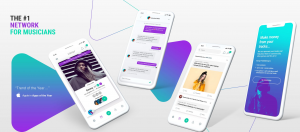
How to build music communities using Vampr
- The discovery tab is the fastest way to meet new contacts for your network or projects. These could be people sharing the same interests as you. Alternatively, they could be contacts specifically for a band or production. You can search based on location, genre, skills and age. Get swiping and connecting with awesome people now!
- Audition your music and videos on your Vampr profile is a non-invasive way to get your music heard. Even people you haven’t connected with yet will listen to your music! Make sure you make your profile the best it can as a first step to getting people listening! ?
- Use shoutouts to create short sharp messages to your network. This might be a collaboration need or a short update about an achievement. Try to encourage people to reach out to you because of what you’re saying by making it more about them than you.
- Vamps are the main way to keep your network up to date on Vampr. Use this feature to record videos, post images or audio to your current network and beyond. We’ll be following up with an article about how to make the best use of Vamps.
Communities who share comments in exciting posts inspire others to get involved. This naturally grows your network through the power of community.
Remember, Vampr is currently optimized as a peer-to-peer network. Connecting with potential fans will be a by-product of getting feedback from your peers. Hone your craft and then work together to reach wider audiences.
Using Vampr to build your music community cuts out the saturation and distractions you’d see on other social media platforms. You can come home to Vampr and always know you’re only going to see music-related content.
Wrap-up
These are just 7 ways to build music communities online, but there are many more.
Maybe, the most important takeaway is that relationships built online (or offline) should be seen as true friendships and not transactional.
If you start your networking journey thinking about what a like-minded person looks like for you, it’ll be easy to find them.
Download Vampr to find local musicians, collaborators or industry executives to help support your music career today.
We’re excited to share this morning that Vampr has been nominated for Developer of the Year at the 2021 App Developer Awards.
Winners will be announced next Thursday, July 29.
The App Developer Awards are the annual barometer for the global app development industry. The 2021 Awards will recognise success and bring to the forefront the leading app developers, agencies and in-house development teams.
This nomination marks the second award nod for the company in 2021.
We’re on a roll 🚀